


Fast PDF Reader
3.422.00 Reviews
App Specs
- Version
- 1.0.2
- Updated On
- License
- Free
- Downloads
- 500,000+
- Developer
- STARSPEED LIMITED
- Categories
- Productivity
- Platform
- Android
Screenshots
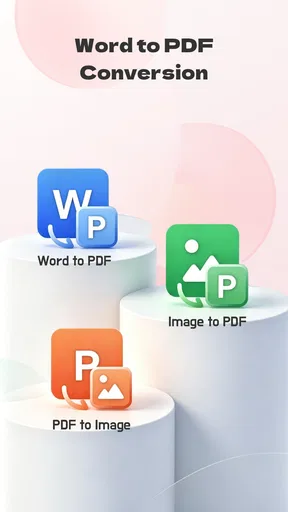
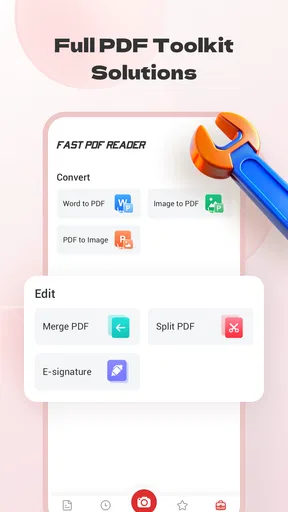
 Analysis by AppCompare
When I need to open a PDF quickly, I usually care about three things before anything else: whether the file opens without fuss, whether the page is comfortable to read, and whether the app gets in the way of the document. Fast PDF Reader is built around that simple need. It is a free productivity app from STARSPEED LIMITED for viewing PDFs and other documents, and its appeal is easy to understand: it aims to be a straightforward reader rather than an all-purpose office suite.
I approached it as the kind of app someone might install after receiving a work attachment, downloading a form, or saving a manual for later. That is an important distinction. A reader does not need to replace a document editor, cloud workspace, or note-taking system if your main task is opening and reading files. At the same time, a focused tool has to make its limits clear. In my experience, the right question is not whether this app can do everything, but whether its narrow purpose matches the way you handle documents every day.
How I Decide Whether a PDF Reader Is Worth Keeping
My first decision criterion is speed in the practical sense, not just a promise in a short description. I want to find a saved file, open it, move between pages, and return to it later with as little friction as possible. The store description calls it a fast PDF reader, but I would judge that claim by the complete workflow: opening a file from a message, locating it in device storage, and reading it without being pushed toward unrelated tools.
The second criterion is document coverage. PDFs are the obvious use case, but people often keep other formats beside them: school handouts, instructions, forms, receipts, and exported documents. Fast PDF Reader is presented as a tool for PDFs and other documents, which makes it more useful than an app designed around a single file type. Still, I would separate basic viewing from editing. If you need to change wording, fill complex forms, sign files, or reorganize pages, a reader may not be the correct category of app.
The third criterion is how well the app fits the device I already use. This release is version 1.0.2 and requires Android 8.0 or later. That makes it relevant to many Android users, but anyone with an older phone should check compatibility before planning a document workflow around it. I also like to consider the age rating: it is suitable for Everyone, which fits a general-purpose utility that may be used at home, in school, or at work.
Finally, I look at trust through user response without treating a rating as a final verdict. Fast PDF Reader has an average score of 3.3 from around 1.2 thousand ratings, with 20 written reviews shown. That suggests a mixed experience rather than universal approval. The app has also passed the half-million-install mark, so it is not an obscure experiment with no audience. I read those signals as a reason to test it against my own routine instead of assuming that the short description tells the whole story.
The everyday workflow I would use
Imagine receiving a PDF timetable in a messaging app while standing at a station. My ideal sequence is simple: tap the attachment, choose the reader if Android asks which app to use, check the relevant page, and close it. Later, I might open the same file again from the document list rather than searching through the original conversation. That is where a focused reader can be more convenient than a large office application that presents editing, sharing, templates, and account features before I can read the page.
Worth Reading Before You Choose

EA SPORTS FC Mobile 26 Is a Bigger Football Game, but It Takes Time

Flipboard Shows What News Apps Must Do Beyond the Feed

Switching to Android Auto Means Rethinking Your Driving Routine

Google Calendar Makes a Crowded Week Easier to Manage

Ludo King Makes the Most of the Minutes Between Plans

Baby Panda World Brings Quick Play to Modern Phones, but Its Game Library Feels Busy
A similar situation comes up with a product manual. I may only need one diagram, not a permanent project workspace. A lightweight viewer is useful when the document is reference material rather than something I intend to modify. For this kind of task, I would pay attention to whether the app lets me move through a long file naturally and whether its controls remain understandable when I am using one hand. Those small details matter more than advanced features I may never touch.
Where Fast PDF Reader makes the strongest case
The biggest strength is focus. Fast PDF Reader is not introduced as a complicated document-management platform; it is positioned as a practical way to view PDFs and other documents. That makes the app easy to consider for people who want a dedicated reading tool on an Android phone or tablet. If your current method is opening every attachment inside a browser or a full office suite, a separate reader may make the task feel more direct.
The best reason to choose it is a clean, purpose-led workflow for reading rather than editing. That distinction can save time. I do not want to launch a large suite merely to inspect a two-page notice, and I do not want a document viewer to make me create an account before I can look at a file. Since this app is free, it is also easy to try alongside an existing tool without making an immediate financial commitment.
Its broad document purpose is another useful point. A phone often becomes an accidental filing cabinet, with PDFs mixed among downloaded documents and attachments. A reader that handles more than one document type can reduce the need to remember which app opened which file last time. I would especially value that when switching between personal paperwork and reference material during a busy day.
There is also a practical advantage in keeping a dedicated reader separate from editing software. A person who only reads documents may prefer not to expose a file to an editor by default, where an accidental tap could lead to changes or a confusing save process. Fast PDF Reader makes sense as the viewing side of that arrangement. I would use an editor only when I actually need to alter content.
Three useful habits that improve the experience
My first tip is to treat the app as the front door for documents, not as the place where every document task must happen. Open and inspect files there, then move to a specialized editor only when the job requires it. This avoids the common mistake of judging a reader harshly because it does not behave like a complete office suite. It also keeps simple reading tasks quick and complex tasks intentional.
My second tip is to organize documents before you need them. If I download a travel confirmation, a warranty, and a school form into one crowded folder, no reader can completely solve the resulting mess. I would rename important files clearly and keep frequently used documents in an easy-to-find location. That workflow matters because the time saved by a fast viewer can disappear if file discovery is chaotic.
My third tip is to test the app with the documents that represent your real life, not only a small text PDF. Try a long manual, a scanned form, a file with images, and a document received from another person. Different PDFs can behave very differently. A reader that feels excellent with plain text may be less comfortable with image-heavy pages or unusual layouts. This test is more valuable than relying on the app name alone.
A fourth habit is to decide whether you need reading continuity or occasional access. If you frequently return to the same document, notice how easy it is to reopen it and continue your task. If you only view a file once, the priorities change: quick opening and clear navigation matter more than maintaining a large personal library. Thinking about this difference helps you decide whether a dedicated reader is genuinely useful or merely another icon on the home screen.
When Another Document App May Be a Better Fit
Fast PDF Reader is not automatically the best choice for every document user. If your work involves revising text, tracking changes, building spreadsheets, or collaborating on files, an office suite is likely a better central tool. Those apps may feel heavier for simple reading, but their broader capabilities become worthwhile when the document itself is part of an active project.
A cloud-first reader may suit you better if your files live across several devices and you depend on synchronized folders. In that case, the key benefit is not only opening a PDF but also knowing that the same file, annotations, or reading position is available elsewhere. I would choose that category when document continuity across phone, tablet, and computer matters more than having a narrowly focused local viewer.
A specialized scanner and document app may also be preferable for paperwork. If you need to photograph receipts, turn pages into a new PDF, fill forms, sign documents, or combine several files, a basic reader will not replace those tools. The trade-off is that a specialized app may bring more menus and a steeper learning curve. For someone who only needs to inspect finished documents, that extra complexity can be unnecessary.
Accessibility needs deserve their own consideration. People who rely on text-to-speech, reflow for small screens, strong contrast controls, or advanced navigation should test those needs directly. A document can be technically viewable yet still uncomfortable to use. I would not select any reader solely because it opens files; readable text size, sensible page movement, and compatibility with the way you interact with your phone are more important than a broad label.
The mixed average rating is relevant here. A 3.3 score indicates that the app may work well for some routines while frustrating others. I would not interpret it as proof that the app is poor, nor would I ignore it. It tells me to avoid switching blindly if my current reader already handles my files comfortably. The app has more than 500 thousand installs, but popularity alone cannot replace a personal test with the documents I actually use.
What switching really costs
Because Fast PDF Reader is free, the main cost of switching is time rather than money. I would need to open a few important files, check how they appear, and decide whether it is comfortable enough to become my default viewer. If I already have folders arranged inside another app, I would also consider whether moving to a new workflow makes those files harder to find.
There is a hidden cost in changing defaults. Once Android associates PDF files with a particular reader, returning to another app can require adjusting the open-with choice. That is not a reason to avoid testing, but it is a reason to test deliberately. I would first use Fast PDF Reader for occasional files instead of immediately making it the automatic choice for every document.
I would also keep the current app available until I have tried several document types. A short test with a simple PDF can create false confidence. My switching checklist would include a downloaded attachment, a long reference file, an image-heavy document, and anything I need to consult repeatedly. If the app handles those comfortably, the change is justified. If not, I would keep it as a secondary viewer or remove it without having disrupted my main setup.
Another practical question is whether you need tools beyond viewing often enough to justify a larger app. If the answer is yes, switching to Fast PDF Reader as your only document tool may create extra steps: read in one app, edit in another, then locate the saved result. If reading is the dominant task and editing is occasional, that separation is reasonable. If editing is central, it becomes friction.
Who I would recommend it to
I would recommend Fast PDF Reader to an Android user who wants a free, uncomplicated way to open PDFs and other documents, especially someone who finds full office suites excessive for everyday reading. It is also worth considering as a second viewer for attachments and reference files. The Everyone rating makes it suitable for a broad audience, while the Android 8.0 minimum keeps the compatibility question straightforward for supported devices.
I would be more cautious for professionals who need dependable document production, collaborative review, advanced form handling, or a synchronized multi-device library. In those cases, a broader productivity platform may save more time overall even if it feels slower for opening a single file. I would also hesitate if my documents are unusually complex and I cannot test the exact formats I use before committing to the switch.
For me, the decision comes down to proportion. If ninety percent of my document activity is reading, a focused app is attractive. If reading is only the first step in editing, signing, scanning, and sharing, the narrow approach may leave me jumping between tools. That is the central trade-off, and it is more useful than simply asking whether the app is fast.
My final recommendation
Fast PDF Reader is a sensible app to try when you want a free productivity utility centered on document viewing. STARSPEED LIMITED has kept the proposition easy to understand, and the current version, 1.0.2, gives users a clear starting point on compatible Android devices. I like it most as a practical reader for attachments, manuals, forms, and other finished documents that I need to inspect rather than rewrite.
My recommendation is to install it as a trial reader, not to assume it should replace every document app immediately. Test it with the files you handle most often, pay attention to navigation and readability, and decide whether its focused approach reduces steps in your routine. If it does, the free price makes keeping it an easy choice. If your work depends on editing, collaboration, scanning, or synchronized document management, choose an app designed around those tasks instead.
In short, Fast PDF Reader is most convincing when simplicity is the feature you are looking for. It will not be my universal answer for every document problem, but it can be a useful everyday viewer for people who want to open and read files without carrying a full office suite into every small task.
Pros
- Opens PDF files quickly
- even on older Android and iOS devices.
- Simple interface makes browsing documents easy for first-time users.
- Supports offline reading without requiring an internet connection.
- Useful search tool helps locate words or phrases in long documents.
- Remembers your last reading position when reopening a file.
Cons
- Some advanced annotation tools may be limited or unavailable.
- Large
- image-heavy PDFs can take longer to load.
- The free version may include advertisements or upgrade prompts.
- Document organization options may feel basic for frequent users.
- Text extraction and copying may not work perfectly in every PDF.
FAQs for Fast PDF Reader
What is Fast PDF Reader, and what can I use it for?
Fast PDF Reader is a mobile application designed for opening and reading PDF documents on Android or iOS devices. After testing its main functions, it is most useful for viewing ebooks, manuals, invoices, study materials, forms, and downloaded documents without needing a desktop computer. Depending on the version available in your region, it may also include tools such as searching within files, zooming, page navigation, bookmarking, and sharing documents.
Does Fast PDF Reader work offline?
Yes, Fast PDF Reader is primarily intended for reading PDF files stored locally on your device, so an internet connection is generally not required once the document has been downloaded or transferred. This makes it convenient for traveling, studying, or accessing manuals in areas with poor connectivity. Internet access may still be needed for downloading files from online locations, displaying advertisements, receiving updates, or using any cloud-related features included in a particular version.
Can Fast PDF Reader open large or password-protected PDF files?
The application can usually handle standard PDF documents, including text-heavy files, scanned pages, and illustrated documents. Performance with very large files depends on your phone or tablet’s memory and processor, so complex PDFs may take longer to load or respond less smoothly. Password-protected or encrypted documents may open only when you provide the correct password, while files using unsupported security settings may not be accessible.
Does Fast PDF Reader allow editing, signing, or converting PDF documents?
Fast PDF Reader is mainly focused on viewing and reading documents rather than replacing a full PDF editing suite. Basic features such as zooming, searching, rotating pages, bookmarking, and sharing may be available, but advanced functions like changing text, filling every type of form, adding legally recognized signatures, merging files, or converting PDFs to Word format can vary by version. Check the app’s current feature list before downloading if editing is essential.
Is Fast PDF Reader free and safe to download?
Fast PDF Reader may be available as a free download, although the exact business model can differ between Android and iOS versions. Free editions may contain advertisements, optional purchases, or limitations on certain tools. For safety, download it only through the official Google Play Store or Apple App Store, review the developer name, permissions, privacy policy, and recent user feedback, and avoid unofficial APK files that could contain modified or harmful software.


